Blog

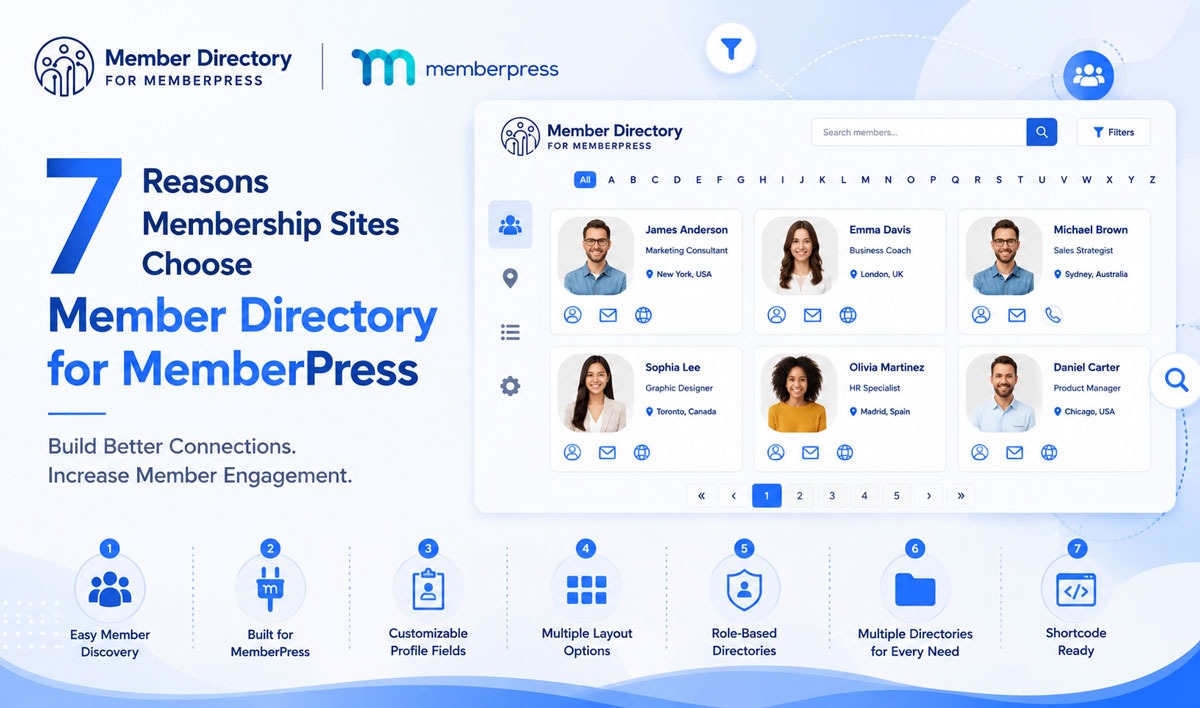
7 Reasons Membership Sites Choose Member Directory for MemberPress

August 19, 2026

Written by Pankaj Verma

7 Reasons Membership Sites Choose Mdfmp Banner 1
Running a successful membership website takes more than great content and recurring subscriptions. Today’s members expect opportunities to connect, collaborate, and engage with others who share their interests, goals, or professional backgrounds.

Whether you’re managing a professional association, coaching community, nonprofit organization, or private membership network, creating meaningful member connections can significantly improve engagement and long-term retention.

That’s why more membership site owners are choosing Member Directory for MemberPress.

Designed specifically for MemberPress users, the plugin helps transform membership websites into thriving communities by making it easier for members to discover, connect with, and learn from one another.

Here are seven reasons membership sites are choosing Member Directory for MemberPress.

1. Members Can Easily Find and Connect With Each Other

One of the biggest challenges many membership websites face is helping members discover one another.

A community may have hundreds or even thousands of members, but if users can’t find people with similar interests, skills, professions, or locations, valuable networking opportunities are often missed.

Member Directory for MemberPress provides a centralized directory where members can browse profiles, search for relevant connections, and engage with people who matter most to them.

Instead of feeling like isolated subscribers, members become active participants in a connected community.

This simple improvement can have a significant impact on engagement and member satisfaction.

2. Built Specifically for MemberPress

Many directory solutions require complex integrations, additional plugins, or custom development.

Member Directory for MemberPress was designed specifically for MemberPress websites, making the setup and management process significantly easier.

Because the plugin works directly with MemberPress users and membership data, site owners can create directories without introducing unnecessary complexity into their technology stack.

This focused integration helps administrators spend less time configuring tools and more time growing their communities.

3. Flexible Member Profiles That Showcase the Right Information

Every membership community is different.

A coaching program may want to highlight member goals and expertise, while a professional association may need to display certifications, industries, or business information.

Member Directory for MemberPress gives administrators control over the information displayed within member profiles. It supports profile customization, field management, and the ability to display relevant member details based on the needs of the community.

The plugin also supports importing and displaying MemberPress custom fields, allowing site owners to create richer member profiles without manually recreating data.

This flexibility ensures that directories remain useful, informative, and relevant to members.

4. Multiple Layout Options for Different Community Styles

Your member directory should feel like a natural part of your website—not an unrelated feature.

Member Directory for MemberPress includes multiple layout options that allow administrators to present member information in a way that matches their brand and user experience goals.

Different communities have different needs.

Some may prefer a clean grid layout, while others may benefit from a more detailed list view. The ability to choose and customize layouts helps create a more professional and user-friendly experience.

This flexibility makes the directory suitable for organizations of all sizes and industries.

5. User Role-Based Directories Keep Communities Organized

As membership sites grow, organization becomes increasingly important.

Not every user should necessarily appear in every directory.

Member Directory for MemberPress allows administrators to create directories based on specific user roles, ensuring that only relevant members are displayed within a particular directory.

This feature is especially valuable for:

  • Multi-tier membership programs
  • Professional associations
  • Coaching communities
  • Educational organizations
  • Private member networks

Role-based directories create a more focused and useful experience for members while helping administrators maintain better control over directory visibility.

6. Create Multiple Directories for Different Audiences

Many organizations serve multiple groups within a single membership website.

For example:

  • Regional chapters
  • Membership tiers
  • Industry-specific groups
  • Professional categories
  • Internal teams

Instead of forcing everyone into one large directory, Member Directory for MemberPress allows administrators to create multiple directories with independent settings and configurations.

Each directory can have its own:

  • Layout
  • Visibility settings
  • Search configuration
  • Member selection criteria
  • Shortcode implementation

This flexibility makes it easier to deliver a personalized experience for different audiences while keeping the website organized and scalable.

7. Quick Setup Without Technical Headaches

Community-building tools should be easy to implement.

Member Directory for MemberPress includes a setup process designed to help site owners launch their directories quickly and efficiently. The plugin provides configuration options and shortcode functionality that make it simple to display directories anywhere on a MemberPress website.

For organizations managing multiple directories, each directory receives its own shortcode and independent settings, providing additional flexibility without increasing complexity.

This allows administrators to focus on growing their communities rather than troubleshooting complicated configurations.

Why Member Directories Matter More Than Ever

Membership websites are evolving.

Today’s members expect more than access to content. They want opportunities to build relationships, share knowledge, find experts, and become part of a meaningful community.

A member directory helps bridge that gap.

By making members easier to discover and connect with, organizations can create stronger relationships within their communities and encourage ongoing participation.

For many membership sites, improving member engagement can lead to:

  • Greater member satisfaction
  • Increased networking opportunities
  • Stronger community participation
  • Higher perceived membership value
  • Better long-term retention

When members feel connected to a community, they are more likely to remain active and engaged over time.

Final Thoughts

A membership website is only as strong as the community behind it.

Member Directory for MemberPress helps membership organizations create more engaging experiences by making it easier for members to find, connect with, and interact with one another.

From flexible profile management and advanced directory organization to role-based visibility and multiple directory support, the plugin provides the tools needed to build a more connected membership community.

Whether you’re running a professional association, coaching program, nonprofit organization, or private membership network, a well-designed member directory can become one of the most valuable features on your website.

Ready to Build a More Connected Membership Community?

Explore Member Directory for MemberPress and discover how the right directory solution can help strengthen engagement, improve networking, and create more value for your members.

Community is not just about
being together physically

“It’s about the connection and engagement among its members. Member Directory for MemberPress empowers communities to thrive by fostering meaningful connections and showcasing the brilliance of its members within their membership-based networks.”

0 Comments

Articles

Related Articles